ChatGPT is good at generating text that's fluid and makes sense in context—but it can also create certain patterns, styles or sentence structures that give away the fact that it was written by AI. And unfortunately, plain ChatGPT text can be instantly detected by AI detectors.
If you're struggling to make ChatGPT writing undetectable, then this post is for you. It addresses how to use ChatGPT's outputs in practice while minimizing the chance anyone can use AI detectors to know that the work came from this language model. Read on to know more!
1. Avoid Common ChatGPT Phrases and Patterns
ChatGPT tends to fall into predictable language patterns and repeating phrases. People reading your writing will be able to pick it apart easily if they're familiar with how ChatGPT writes.
Phrases like "In today's xxx landscape", "It is also worth noting", or "delve/dive into" are super ChatGPT-y things to say and will give you away instantly.
But if you can identify ChatGPT's predictable writing and adjust for it, you can sound more natural. Here are a few ideas for how you might go about that:
Rewrite the Commonly Used Phrasing
The phrases mentioned above are the things you should pay special attention to. You can also take a look at this Reddit post for more common ChatGPT phrases. You can add a little spice by swapping something generic in and of itself with something a little less predictable.
Example:
- Original (from ChatGPT): "It is also worth noting that the…"
- Alternative: "You'll also want to keep in mind that the…"
Mix Up Sentence Length and Structure
In my experience, human writers often mix up sentence lengths in their prose without even thinking about it, and I've noticed that ChatGPT's writing has a sameness to both the sentence length and structure (which are also often unnecessarily long).
Be More Direct
ChatGPT has a tendency to over-explain things, so cutting through the extra fluff can leave a piece feeling a lot more human-written to my ear.
Example:
- Original (from ChatGPT): This method is useful in the sense that, while there will certainly be times when what you want to do isn't something someone else has written instructions about, it will allow you to accomplish simple-to-moderate difficulty text animations with relatively minimal thought and work.
- Probably better version: This is a handy method to know, because there are definitely times when what you want to do won't be something someone else has bothered to write instructions about (you'll learn why in a later section of this post), but it at least gives you an easy way to do simple-to-medium-difficulty text animations with very little thinking and work.
In general, I think you could apply a big red slash to almost any instance of "in the sense that," "while," "and work" here and improve the piece greatly.
If you take a draft that was largely AI-written and go through and tweak things like sentence lengths and word choices like this, you can eliminate most of the AI "sound".
2. Change the Point of View (POV)
ChatGPT's writing is often written from a neutral third-person perspective—until instructed to do otherwise.
Humans, on the other hand, don't always write from the same perspective all the time. A single essay can include multiple points of view based on what works best at each moment.
So by changing the POV, you can easily make your ChatGPT writing sound more natural and increase the likelihood of avoiding detection.
Let's walk through how to change POV:
First Person (I/We)
One simple way to break up the neutrality of third-person writing is to switch into first-person voice for certain parts. The I voice sounds more like you're talking to someone rather than like an encyclopedia entry, which is a good thing!
Example: When third person – "When one plans something, there are usually many factors to consider…"
When first person – "As someone who had done a lot of planning myself when planning that project, I wrote down…"
Second Person (You)
Sometimes, it feels right to talk directly to the reader. When you do, you switch to second person, which is almost never used in conventional writing. But for a blog post or essay, it adds another flavor of authenticity to go along with the author voice and first-person voice.
Example: Instead of – "It might also be helpful to…" Try – "You might also find it useful to…"
Switching between points of view in writing is one of those little things that humans naturally do but machines don't do automatically.
3. Add Personal Experience and Examples
One of the clearest tells that something was written by an actual person is if there are stories about their own life or specific examples used to make a point. ChatGPT does not have its own life experience to draw on, so inserting any kind of real-life example into its writing would automatically humanize it.
If you want to incorporate some of your own life into your writing, here's how to do it:
Real Life Specifics
Replace broad, general words with something more real. So instead of, "Many people enjoy hiking," you might write something like, "Last summer, I went hiking in Yosemite National Park and the view from Glacier Point was one of the most stunning things I've ever seen."
Common Experiences
Write about parts of life that almost everyone can relate to—cooking your favorite meal, your morning commute to work, going to your grandmother's house for Christmas.
Pure Feeling
Talk about what certain times made you feel: "I was terrified and excited as I published my first blog post." It's much more interesting to read about those feelings than something generic like, "A new blogger faces many challenges."
Putting real-life specifics, common experiences, and pure feelings into your writing is what makes it feel authentically human.
4. Err Like a Human Being
One of the telltale signs of AI-written text is the fact that it's perfectly error-free. People make mistakes—typos, grammar slip-ups, momentary lapses in logic—and a text that reads like it was written by an actual human being should have some of these.
If It Bleeds, It Leads. Here are a few different ways to err intentionally:
Typos
Add in an occasional typo, like writing "teh" instead of "the." But don't overdo it—too many typos makes text seem amateurish, not authentic. (And remember, the autocorrect feature might undo your work.)
Grammar and Punctuation Errors
Break the rules for fun, or forget a rule you know and use informal grammar. Put a comma where you wouldn't normally put one. Make a sentence fragment or write a contraction where a more formal context calls for "not." Write something like, "Me and my friend went to the store" instead of the correct "My friend and I went to the store."
Style Errors
Shift between levels of formality in the voice or density in the argument or topic. Change styles at a random point without proofreading the transition so the styles are inconsistent. This can add to the authenticity and cover your tracks because a human wrote that part.
5. Try an AI Humanizer
If you want something that can help you make your text read like it was written by a human, AI humanizing tools are built specifically for this. It can reform AI-generated text so no one could ever tell it wasn't written by a person. And we suggest you try FreeHumanize.
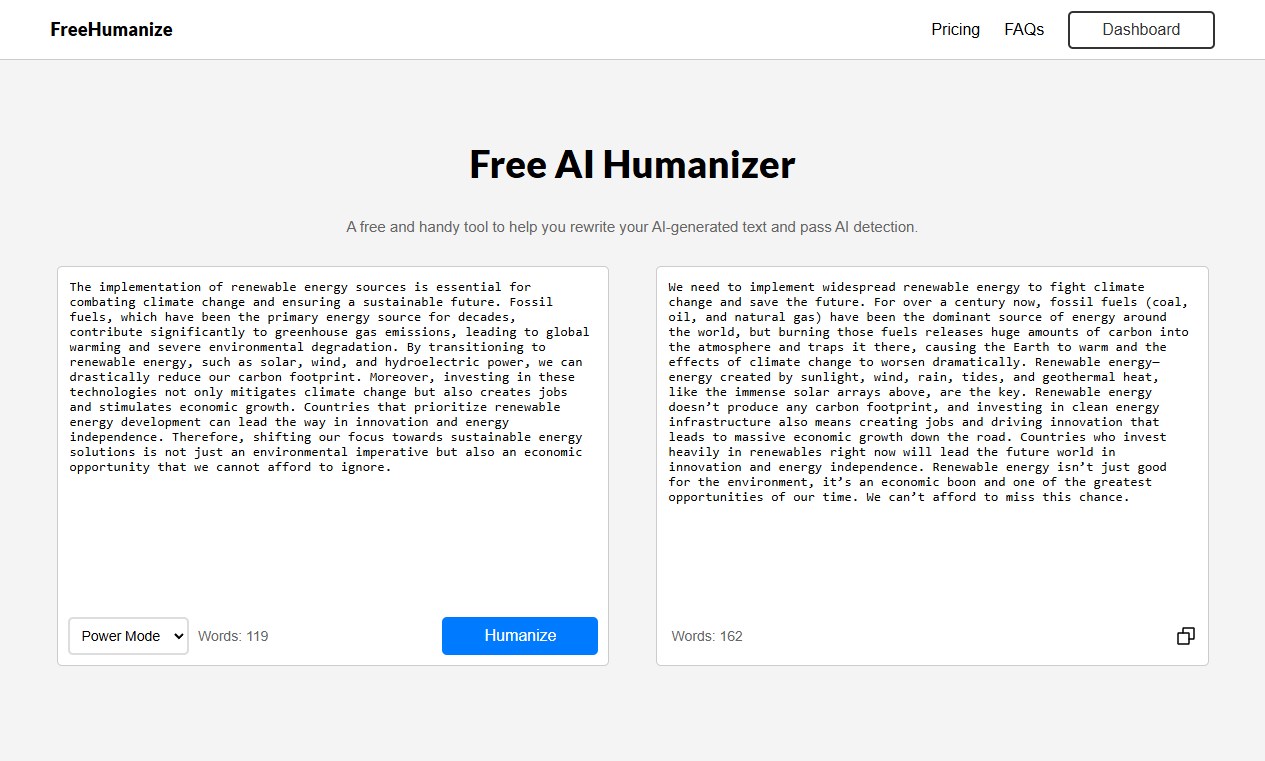
It'll change the way the writing sounds, make the tone feel more genuine, make the words flow in ways humans write. If you have some text written by ChatGPT and you want to make it human-like, put it through FreeHumanize and you can get undetectable results instantly.
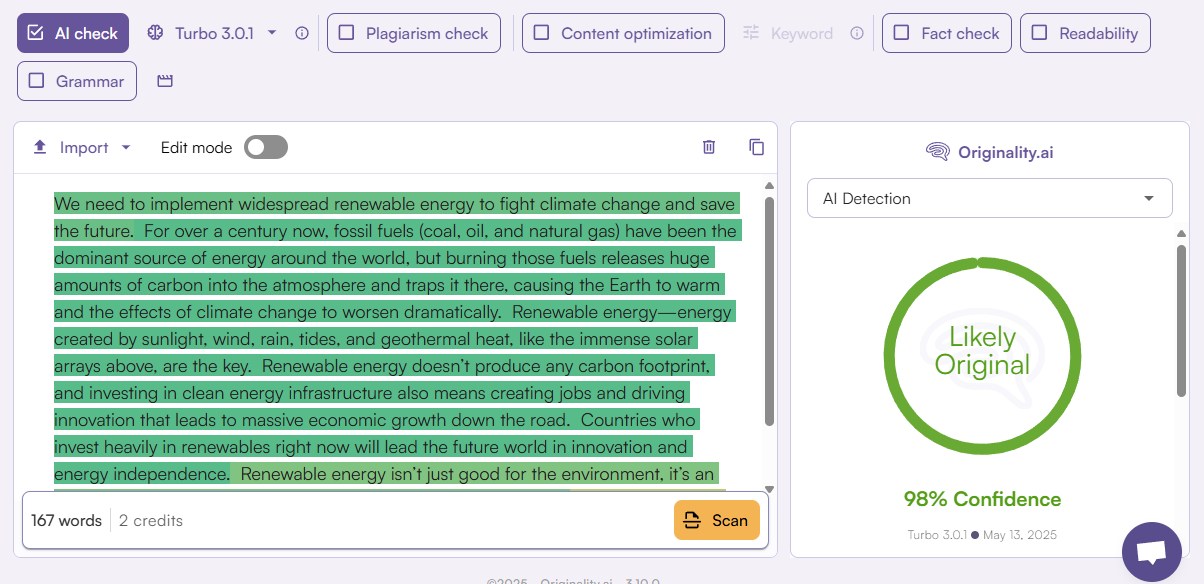
Try FreeHumanize to make your ChatGPT writing undetectable now!
Conclusion
Making ChatGPT (or any other AI) writing undetectable really just comes down to making it feel human. Between avoiding AI's telltale patterns, changing the point of view, adding your own real-life stories and experiences, throwing in some purposeful errors, using some AI humanizers, and/or a combination of all of these, you'll end up with something that flows well and reads authentically